
Sintron ST-002 / ST-003 Coin Operated Timer Box Instruction
Tech Support: sales@sintron-hk.com

This is used for coin operated power supply timer control. With this coin operated timer box, you can easily connect your machine to it and then let your users to pay to use. Free to set up time, price, and operating mode. It is especially suitable for 110V~240V Washer & dryers, and any machines that would need timer.
Specification
⚠️ Do not allow the ST-002/ST-003 coin box to come into contact with your washer or dryer to prevent damage caused by machine vibrations.
⚠️ Important notice for the ST-003 30A: As this high current will generate significant heat, ensure it is placed in a well-ventilated area and kept away from heat sources, such as a dryer.
PS: For our US and Canadian customers, we have pre-configured the coin settings prior to shipping. If you only use standard coins (US: quarters / Canada: $0.25, $1, $2), you may skip the coin setup and jump directly to Timer Setup. However, if you experience any accuracy issues or prefer custom calibration, you can still perform the coin setup again at any time.
PS. For Canadian coins, $1 coins before 2011 are different from $1 coins after 2011. Please treat them as separate coins and set them up in different channels. For example, use A1 for $1 coins before 2011 and A2 for $1 coins after 2011. The same distinction applies to $2 coins before and after 2011.
👉 See the Canadian coins setup video below in Part 1: Sintron ST-001 Coin Setup.
Quick Start Guide
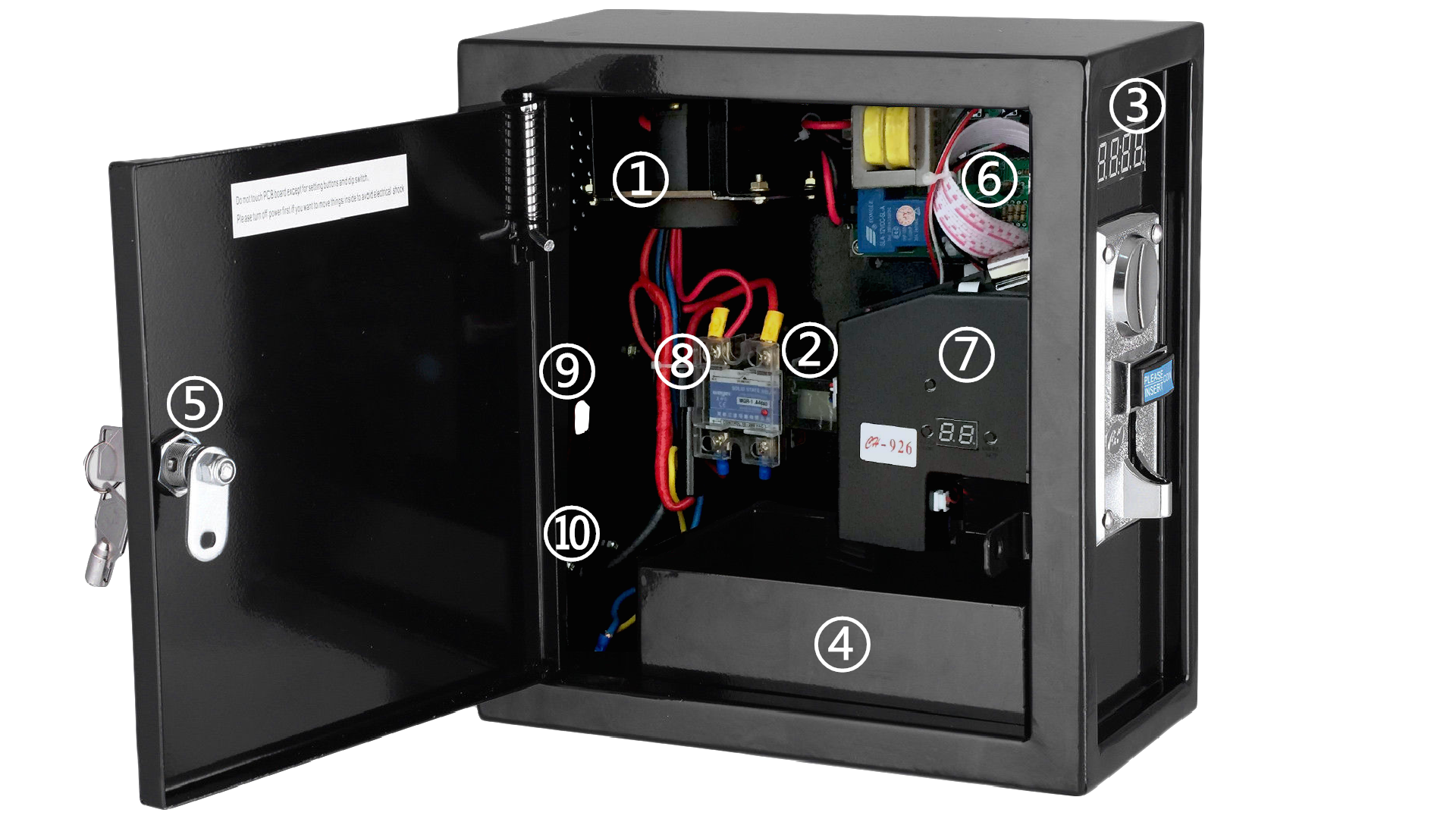
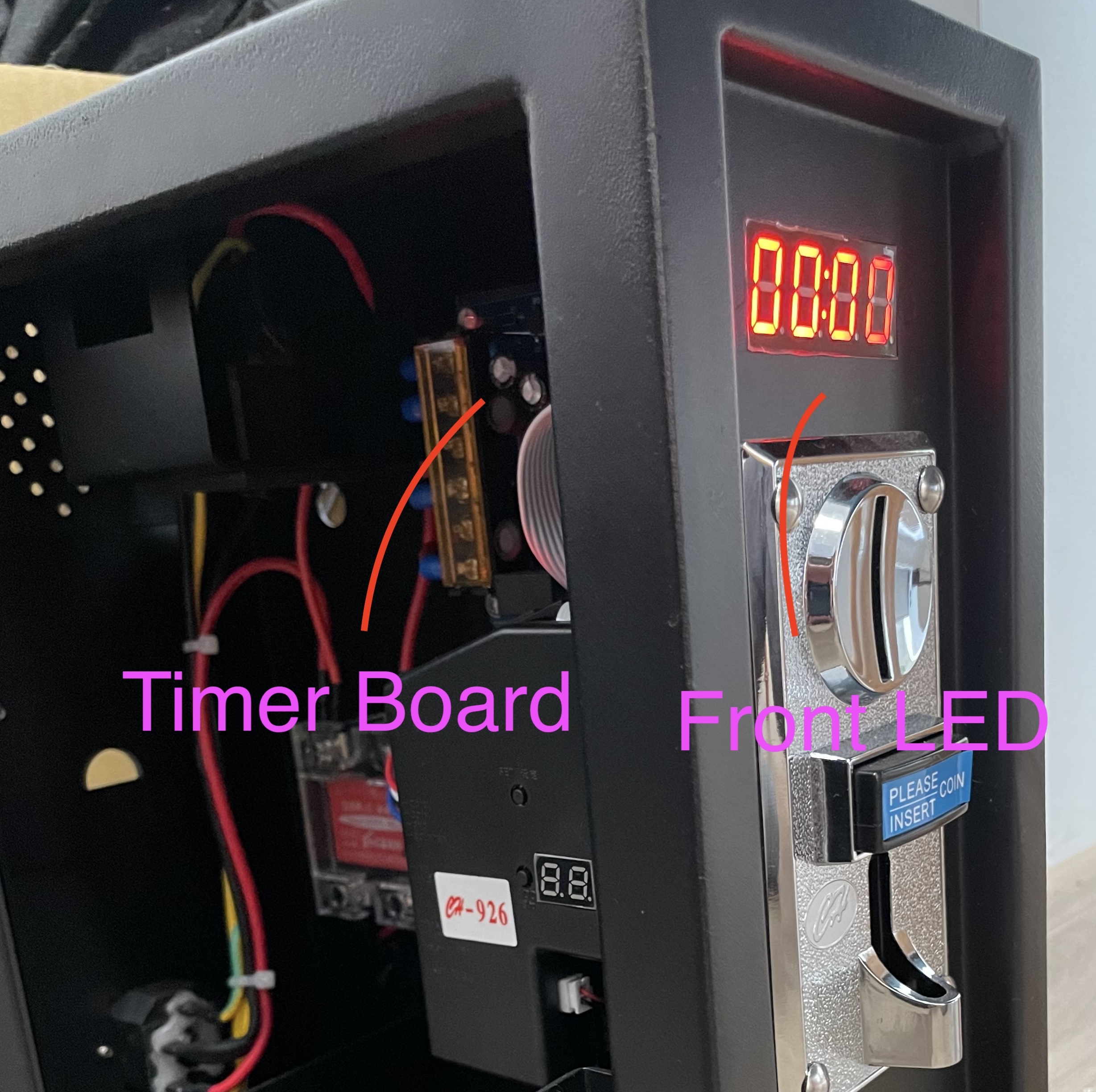
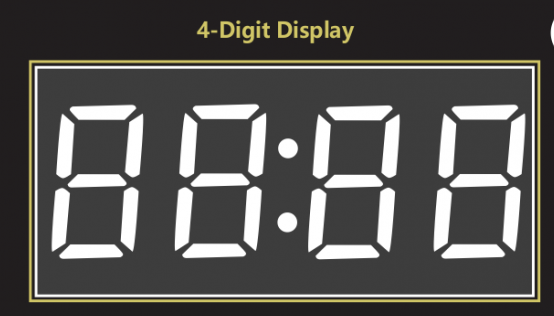
- Plug power cord (No. 10) to AC 100V~220V. 4 digits LED (No.3) should light up and show 00:00.
- Please program coins on coin acceptor (No. 7) based on "Coin Setup".
- Set up time, price and operated mode on timer board (No.6) based on "timer setup".
- Please power off.
- Please plug power wire of your device by going through No.9 into the receptacle (NO.1) ps. might need some force. tighter is safer.
- Please install the rear access panel cover.
- Please turn on power and insert coins. then you should see the timer running. if not, please double check step 2 and 3.
-
you can use
Counter function
for counting the coins. this is to make sure what you got from (No.4) :Money
collection box is the correct amount.
- Free to check total amount on display.
- Lock(NO.5) it up and ready to use.
Part 1: Sintron ST-001 Coin Setup
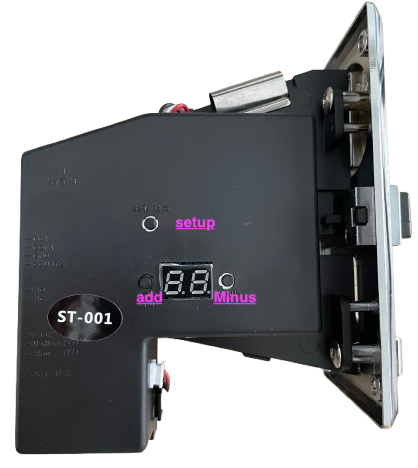
Sintron ST-001 is a multi coin selector, can accept up to 8 kinds of different coins at the same time. This type of coin selector is widely used in Vending machine, Message chair, and other self–management system.
You will need to use 3 buttons, please identify them as below: setup, add, minus buttons.
Coin Setup Work Flow
Step 1: do the "Learning Process" for ST-001 to learn the coins you will use.
Step 2: Set the value for the coin.
FAQ: If you accidentally mix up your settings, you can perform a factory reset. Please note that this will erase all stored data.
Check How to do Factory reset for ST-001 coin acceptor
Video demo - set up Canadian coins
🪙 Using tokens instead of coins? Check token details here →
Part 2: Sintron ST-002/ST-003 Timer Setup
please locate the timer board in box.
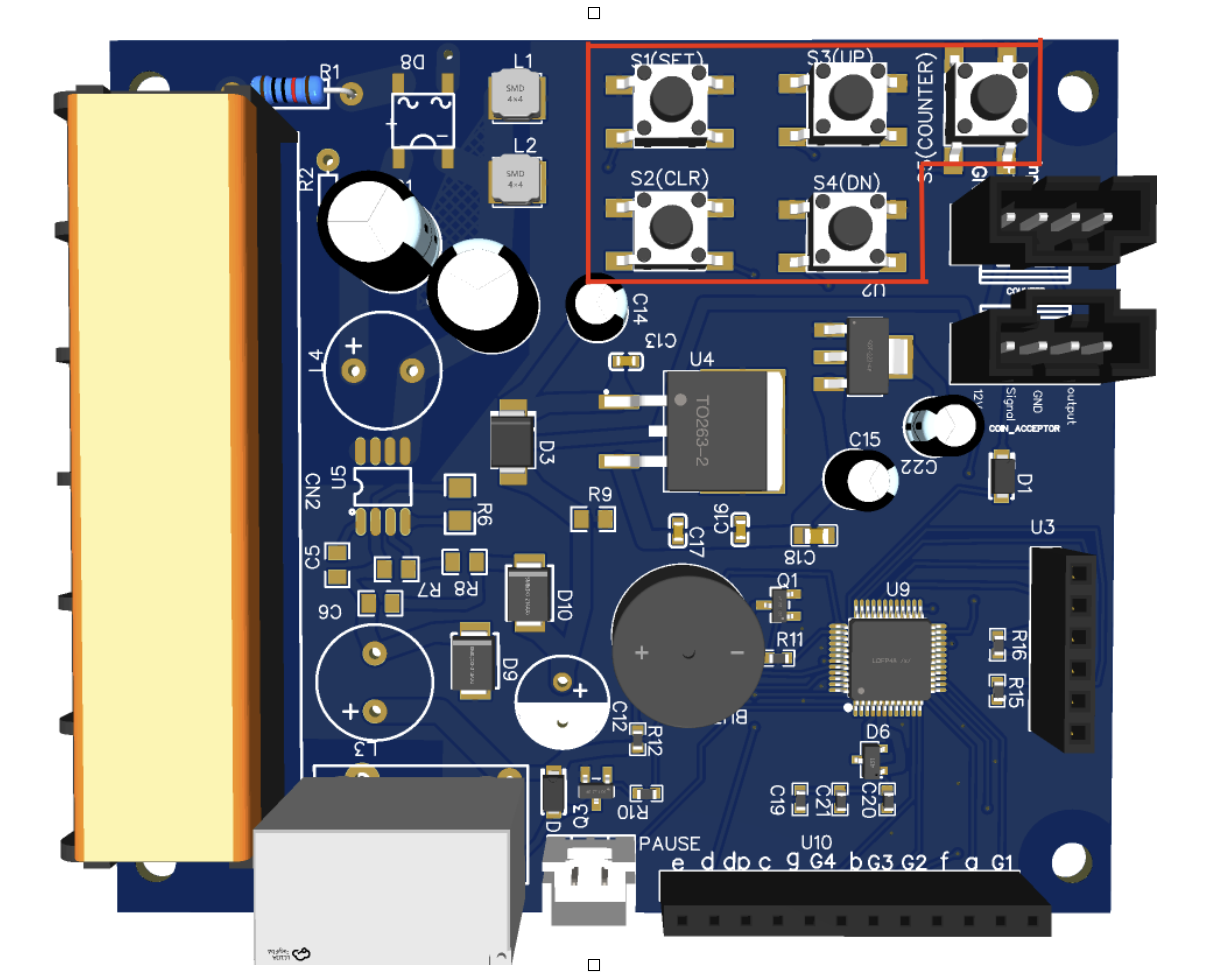
there are 5 buttons on Timer board: S1 (SET), S2 (CLR), S3 (UP), S4 (DOWN),
S5(COUNTER),
Understand the Work Flow
Step 1: Setup for the Time.
goal to achieve: start running for specific time.
Step 2: Mode settings. (optional)
goal to achieve: some extra function when needed.
Step 3: Check Counter (optional)
goal to achieve: this offers you information about how much money
customers paid.
Below are the details of the Steps.
Step 1: Setup for the Timer.
1) Setting the Charge Value:
Press the "S1" (SET) button — the display will start flashing. Use the "S3" (UP) and "S4" (DOWN) buttons to set the Charge Value,
For Example:
0 25 means to charge $0.25 and then trigger the time.
1 25 means to charge $1.25 and then trigger the time.
2 00 means to charge $2.00 and then trigger the time.
2) Press "S1" (SET) button and set the time (00-59) for the first two digits.
3) Press "S1" (SET) button again and set the time (00-59) for the last two digits.
Then you would get, for example, 50:00 minutes:seconds.
PS. 2) and 3) would be the time you would like to run when receiving 1) Value Parameter.
Note: if you would like to use more than 99 minutes, please check Step 2 and adjust it to be ( Hour:Minute) mode.
then Time Setup is completed.
Click to Check Timer Video setup.
Step 2: Mode Settings (optional)
1). Please Press and hold "S3(UP) button" and "S4(DOWN) button" simultaneously for 3 seconds. then it enters " Mode Settings".
we use the 4 digits code to setup the mode.
2). Please "S3(UP) button" and "S4(DOWN) button" to adjust value. and "S1(SET) button" to switch to next code and finally "S1(SET) button" to save.
| Mode | code for 1st digit | code for last digit | Description |
|---|---|---|---|
| Running Time | 1 | 01 | Timer running automatically after coins inserted. |
| 1 | 02 | Timer running after button pressed. (Disabled for ST-002 ST-003). | |
| Time format | 2 | 03 | Minute:Second |
| 2 | 04 | Hour:Minute | |
| Warning Sound | 3 | 0~59 | When time is below this value, it would beep once and flash the LED. |
| Add extra time | 4 | 0~59 | While timer still running, it would add extra time by 0-59 minutes, |
| extra time coin value |
after Press the setup button from last step, make sure to assign a
coin value, for example: 0 25 means $0.25 to add extra time 1 25 means $1.25 to add extra time |
||
|
Default: 1:01 ( Timer running automatically) 2:03 ( Minute:Second
) 3:30 (Warning below 30) 4:00 (no extra time function) |
|||
Click to Check Optional Setup Video setup.
Step 3: Check Counter ( Optional )
There are two counter functions. The first is the Resettable Counter, and the second is the Non-resettable Counter.
When the S5 (Counter) button is pressed for the 1st time, it switches to the Resettable Counter. Pressing it again (the 2nd time) switches to the Non-resettable Counter.
1. Resettable Counter (Money Received Since Last Reset)
If press S5(Counter) button and hold for 3 seconds, it would reset this Counter.
Usage: Tracks earnings over a specified period, such as a daily or weekly basis.
Benefit: Allows for easy monitoring of recent financial activity while still keeping the total earnings in the non-resettable counter secure.
2. Non-resettable Counter (Total Money Received)
Usage: Tracks total income received since the system was first installed.
Benefit: It ensures transparency and provides a secure, permanent record of
the system's total earnings.
FAQ
Q: No power after using for a while?
A: The fuse has likely blown to protect the machine. Replace the fuse near the power input (No. 10). Contact sales@sintron-hk.com if you need help locating it. ▶ Watch Video
Q: Can I use tokens instead of coins?
A: Yes. Train the ST-001 with tokens just as you would with coins. Get tokens here.
Q: The timer does not count down after inserting a coin.
A: (1) Verify the coin acceptor is correctly trained (Part 1). (2) Check that L1–L8 coin values are set in the timer board (Part 2). (3) Confirm the wire between the coin acceptor and timer board is secure.
Q: The acceptor takes coins it shouldn't.
A: Sensitivity is too high. Lower it until only the correct coin types are accepted. See the sensitivity adjustment video.
Q: How do I reset the coin acceptor to factory defaults from (Part 1: Sintron ST-001 Coin Setup)?
A: Hold the SETUP button on the ST-001 for over 5 seconds. Note: this operation would erase all the learned coins.
Q: How do I reset the timer setting to factory defaults from (Part 2: Sintron ST-002/ST-003 Timer Setup)?
A: Hold the CLEAR (S2) button on the main board for over 5 seconds.
Q: How do I extend my warranty?
A: Submit the Sintron Warranty Request Form to extend by 1 year (total 2 years).